YOUR NEXT IDEA STARTS HERE
Less searching.
More engineering.
Meet SnapMagic Engineer. Your AI workspace for finding components, exploring circuits, and taking the next step in your CAD tool.
Available for Apple Silicon and Intel Mac · Sign in with your SnapMagic account
● ● ●SnapMagic EngineerWORKFLOW PREVIEW
FROM A QUESTION…Help me explore a circuit for my next project.

Explore the circuit, inspect its components, then bring your design into CAD.
Real componentsEditable schematic
What are you building next? ↑
…TO SOMETHING YOU CAN BUILD ON
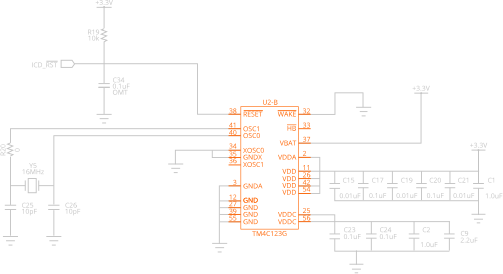
Inspect. Refine. Export.Open in CAD ↗
Fits your engineering workflowKiCadAutodesk FusionEAGLEAltium*OrCAD*
*CAD file export. Direct desktop integration availability varies by tool and operating system.
MORE THAN A PROMPT BOX
Your engineering toolkit.
Finally, in one place.
Move between the question, the component, and the circuit without losing your train of thought.
01 / DESIGNStart with an idea.
Keep going with AI.
Describe the circuit you need. Explore a schematic, ask follow-up questions, and refine your design in a conversation.
“Can we use a lower-power part?”“Explain how this circuit works.”“Help me choose the right components.”
02 / DISCOVER⌕
The right part.
Less detective work.
Search components and inspect symbols, footprints, 3D models, and datasheets from the SnapMagic library.
03 / COMPARE⇄
Explore your
alternatives.
Find alternate components and compare the details that matter before making your selection.
04 / BUILD↗
Bring it into
your CAD workflow.
Download CAD models and export schematics. Use supported desktop integrations to take your work into your design tool.
05 / EXPLORE▤
A head start on
your next design.
Explore reference designs and pick up where you left off with saved desktop conversations and workspaces.
FROM THE FIRST QUESTION TO THE NEXT REVISIONStay in your flow.
01Ask or search
Describe what you want to build, or find a component you already have in mind.
02Explore the details
Inspect the schematic, review part information, and refine your requirements.
03Make it yours
Download, export, or open in a supported CAD tool. Review and validate before fabrication.
CURIOUS? START RIGHT HERE.What are you
building next?
Try circuit generation in your browser.
Get the desktop app for the full workspace.